
Think of your Amazon campaigns as a machine with different levers you can pull to generate different results. Our goal is to pull enough levers which will maximize the efficiency of each dollar spent.
Today, we’re going to run through how pay-per-click (PPC) works on Amazon, the drivers to good and bad ACoS, and six tactics you can use to decrease your ACoS for your Amazon PPC Campaigns.
How PPC Works
PPC is an auction bid system where various competitors bid to have their ads show up for specific keywords (search terms). The higher your bid, the higher your ad shows up.
Simplified, this means if I wanted to bid on the keyword “air fryer” and I bid $2.50 (my CPC), if I had the highest bid, I would get the first ad slot. If I was to be the second highest, I would get the second slot, and so forth.
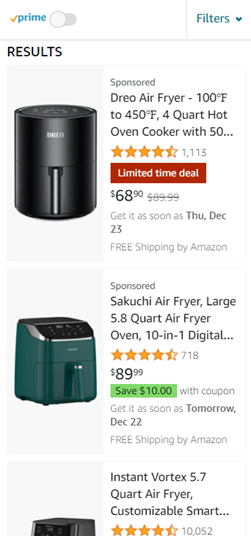
There is a statistic floating out there that over 80% of purchases happen on the 1st page. This is hard to validate, however based on my personal experience selling over $100m per year, this seems true. The reason it’s important to win a higher ad spot is that no one will see your ads beyond the first few pages of search. The farther down the bid rank you go, the lower your probability of earning a sale.
Reason Why your ACoS is High
There can be several reasons why your ACoS is currently high, rising, or not improving. Here are a few reasons:
- Increase in competitors
- Non-differentiating features
- Lower price
- Poor customer reviews
- Irrelevant keywords in your campaign
- Overbidding
- Underbidding
Diagnosing the root problem to your ACoS takes a bit of investigative work. The good news is all the answers are hidden and available within the data. Our team at First Light Studios can help you understand your data and come up with actionable solutions to improve your Amazon PPC Campaigns.
Techniques to Decrease your ACoS
We’re going to show you some techniques we use to decrease ACoS and improve the efficiency of your Amazon Advertising engine:
- Decrease bids for non-performers
- Find new opportunities by dissecting the data
- Remove irrelevant keywords
- Add new keywords
- Break down campaigns by product type
- Adjust bid multipliers for Top of search and Product pages
Decrease bids for non-performers
This is the low hanging fruit. We want to bid down on keywords that are outside your ACoS goals. Make sure there is enough spend for that keyword before you bid down.
Find new opportunities by dissecting the data
There are two ways to view the data: manually and via 3rd party software. For the sake of this article, let’s go manual.
Enter your Amazon Advertising portal and click on Reports on the left menu bar.
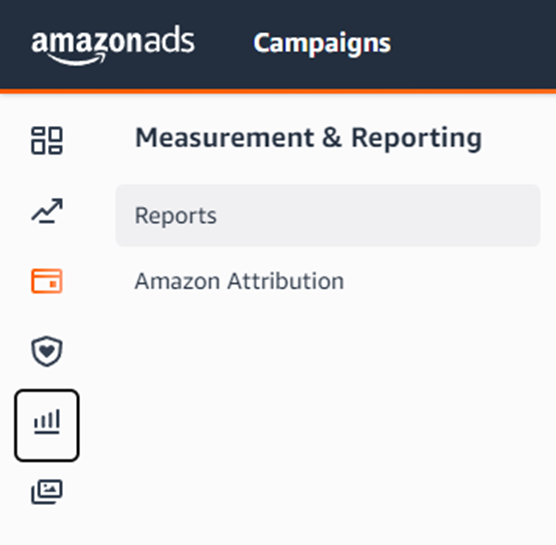
Click on Create Report. By default, the report type is set to Search term which is what we want. If you are not familiar with the various report types, check out our post where we review each type and what they do: INSERT NEW LINK
Now you have the raw data and can use filters or Pivot Tables to dissect the data.
Remove irrelevant keywords
From the step above, you’ll be able to identify keywords that are simply irrelevant. You’ll know this from keywords that are spending, but not converting. Take a look at the keyword and put yourself in the shoppers shoes. Would I use this keyword to search for the product being advertised? If your answer is no or maybe, add to your negative keyword list.
Add new keywords
Your campaigns should be generating lots of rich new keywords that should be added back to your campaigns on a weekly basis.
Break down campaigns by product type
In order to get the highest efficiency out of your ad dollars, we want to separate campaigns into product types. That means we don’t want any “blender” products in our “air fryer” campaigns. If you are mixing product types within a campaign, split them out and create a new campaign(s).
Adjust bid multipliers for Top of search and product pages
It’s generally a good idea to have a small multiplier for Top of search so that you’re bidding a bit more when your ads on showing on the 1st page. When your ACoS is struggling, consider turning these down.

Additional Considerations
- Dayparting – 3rd Party software allow you to turn off ads during certain hours of the day so you can reserve budget to last throughout the peak hours. We implement this feature in-house at First Light Studios to allow our clients budgets to stretch further.
- Tracking your competitors – You really should be keeping tabs on your top competitors for each product type. For various reasons that will help you make informed decisions regarding your campaigns.
- Deploy a full-funnel Amazon Ads strategy – Most competitors are not utilizing all ad-types. That’s usually due to bandwidth and cost. There are certain ad types that have a really high ROAS. If none of your competitors are utilizing a full-funnel strategy, a free lunch is available.
I hope you gained insights into the drivers of ACoS and how you can improve your Amazon Ad campaigns. Today we briefly dove into the basics of how PPC works on Amazon and six tactics you can use to drive greater efficiency for your Ad campaigns. If you have any questions, feel free to drop us an email below.
If you’re interested in learning about our Amazon AMS management, reach out to us.